
My time of copping out is over.
Of course, that doesn’t mean that my time of writing good code has started yet.
In any event, I managed to get the demo together. Odd how it always seems to take one more week than I expect for me to get stuff done.
Screenshot:
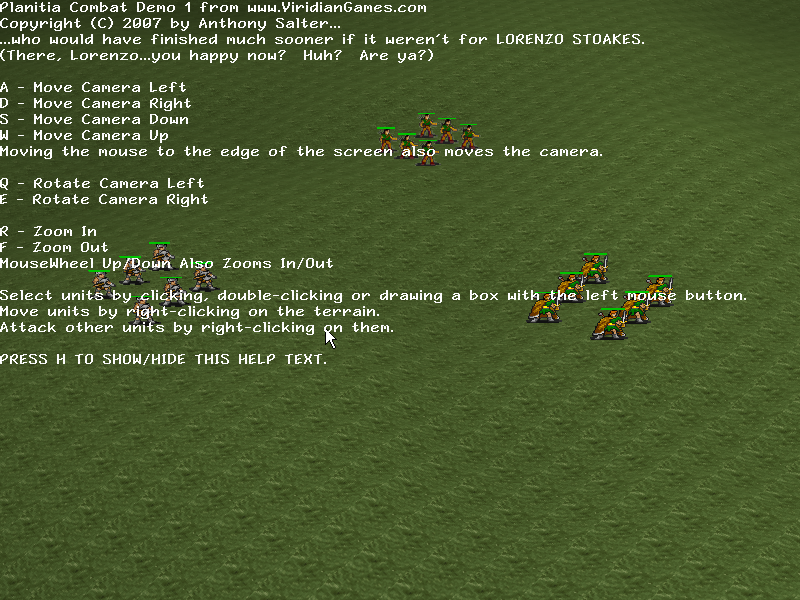
And here’s the download link. It’s just over a meg.
Please play it! Please comment! Basically I’m looking get the feel of the camera control and the combat very natural – that’s all this is about. If you feel that anything works kind of clunky, please tell me. If something you thought should work didn’t, please tell me. If your machine crashes, please tell me so I can have you send me your log file.
The next update should have some god powers!
Edit: Thanks to whoever voted this entry up on Qatfish.com – this is my highest-ranking entry ever.
Note: If you get a message saying that you are missing “d3dx9_31.dll”, update your DirectX. Yes, even if you have 9.0c. See, there are different versions of 9.0c.
Note: I am aware that moving units off the map crashes the game, but the map is so big that this shouldn’t happen accidentally.
Version .11:
Removed two large unnecessary files from the download package, thus shrinking it from five megs to one meg.
Pretty cool 🙂
Worked fine here.
Small issue: You should be able to select by dragging in the up left direction too. (normalize your selection rect before sending it for processing?)
Mouse wheel scaling strength should adjust with current scale, ie, so it doesn’t take forever to scale when very far away.
hmm mouse pointer is really laggy. can’t move camera in two directions at once, with keys or screen-edged-mouse. box-selecting only works if you go upper-left to bottom-right, no other directions work. people aren’t smart enough to move towards the archers to attack back when they’re being shot at. maybe they’re just really loyal to your orders? ^_^
nice terrain, yay zooming, rotating is interesting but not really necessary as far as i can tell. i like the zoom alot 😛
in what direction are you taking this project? i can’t actually tell where you’re going with this :d
Oh, right…I knew that about the selection box but forgot to fix it. Time to put that task on the list.
And yes, you should be able to move in multiple directions at once, I’ll add that as well.
Well, Planitia is basically going to be a real-time strategy game with god powers. It’s not going to be as combat-focused as a lot of RTS games, but it will have combat so I decided to start with that.
Hmmm…anybody else getting a laggy mouse pointer? I haven’t seen anything like that myself.
Die pixelated baddies!
Take that!
Looks really nice. No laggy mouse pointer here.
Definitely needs to be able to do two camera moves at the same time — not just ‘up’ and ‘left’, but also left and zoom out at the same time, too. Same with rotating.
Also, any chance of a tilt function? I like my cameras a *little* closer to the ground than this, so I can see the horizon. It’s nice to have the option.
Other than that, works perfectly. Perhaps a walking animation on the sprit… no, forget that last one.
d
Hey I’m famous and I AM HAPPY NOW!!!!
I feel you should be able to get the mouse out of the window when you shift the pointer to the side. Plus you should be able to right click the terrain and rotate it left or right.
I’d like there to be a sense of momentum as you rotate, so have it gradually accelerate and when you stop rotating slightly bounce into place. This seems to be a common feature of games with a rotating camera like this.
By the way, works fine in Vista since it runs for me 🙂
I downloaded the demo, and unzipped it. When I click on Planitia.exe I recieve an error dialog box with the following
C:PlanitiaCombatDemoOnePlanitiaPlanitia.exe
This application has failed to start because the application configuration is incorrect. Reinstalling the application may fix this problem
Wow…not sure, WonderMellon…you do have the most recent DirectX run-time installed, right?
Worked great for me Viridian! *cheer*
Nicely done. No laggy mouse pointers and I’m even running on a laptop! 🙂
Yes, same comment above about the box banding. It only works from left-to-right.
I noticed the inclusion of fmod along with some sounds…except I didn’t hear anything
throughout the whole demo…is that outside the “scope” of this version?
Awesome work so far though man..grats!
I have DirectX 9.0c (4.09.0000.0904)
Apparently I am the only one with issues it sounds like.
Worked great here. I’m running XP, most recent DirectX versions. I didn’t notice any lag in the mouse movements.
WonderMellon: No, GB had the same problem on his laptop. Unfortunately I don’t have enough data yet to fix it. I’m sorry.
Nice 8)
So, moving with wsad keys is too slow, speed it up a bit. The camera rotating too fast, slow it down. Make the selection box work in all directions. Adjust maximum camera zoom-in and out, because there is a little artifact when you zoom too much in. Also, you have to filter the sprites better – they are awful-looking at big distance. And asign the camera moving to the MMB (middle mouse button) – its very handy when you must move quickly in the game process. There are strange glitches when moving the units. Also, health bars are not the same width at medium distance. And yes, the archers are shooting too fast – I barely notice the arrows. Try to slow them down a bit, and make trails for them. Not so long like at Stronghold of course 8)
Waiting for sounds to work 8)
Panning too slow – fixed.
Rotating too fast – fixed.
Panning, rotating and zooming now all have a bit of braking at the end so that they don’t feel so “hard”.
Panning and zooming are also now multiplied by the distance from the ground so that you move and zoom faster the farther you are zoomed out (keeps it from taking too long to move around when fully zooomed out).
Sprites awful close up and far away – will be fixed by limiting how close and how far away the camera can get.
Moving the camera with the MMB – hasn’t been implemented yet. I’d like more information on what kind of control system you’re talking about – is it just “Hold MMB and move left-right to rotate” or something more?
Strange glitches when moving units – Unit movement is now framerate-independent so they should move much smoother.
Health bars are actually 3D quads just like the units, so they are subject to the same deformations units are. Not sure if I’m going to fix it or not.
Arrows are now much slower (possibly too slow) but they should now be much more visible and it should be much more obvious how they work.
Thank you very much for your feedback. I’ll probably post another alpha next weekend with all my changes.
Moving the camera with the MMB – I mean, you press MMB, move right – camera moving right, left – left. Not rotating. Panning. You can also try the dragging style – this is when you press MMB, you hold the ground, and “drag” it. Just like you do while reading *.pdf files.
Health bars – try making them only zoom related. I mean, make them all same size at specific zoom, and their scaling also depends on the zoom.
I’m having the same issue as WonderMellon. DirectX 9.0c (4.09.0000.0903) You should make it output a debug log so you can figure out where it’s going wrong on different people’s systems.